Enhancing AI Product Management: How Claude Handles Multiple Roles and Contexts
When AI becomes a collaborator in daily work, we often find ourselves in the absurd situation of “context transportation.” This article reveals the fundamental contradictions in AI-human collaboration within traditional workflows through a practical case of reconstructing a membership points system. Ultimately, a dual-track system using “Obsidian + Feishu” and a virtual team model with 19 AI roles is constructed. This represents not just a tool iteration but a revolutionary way of thinking about how to let AI truly “take over work.”
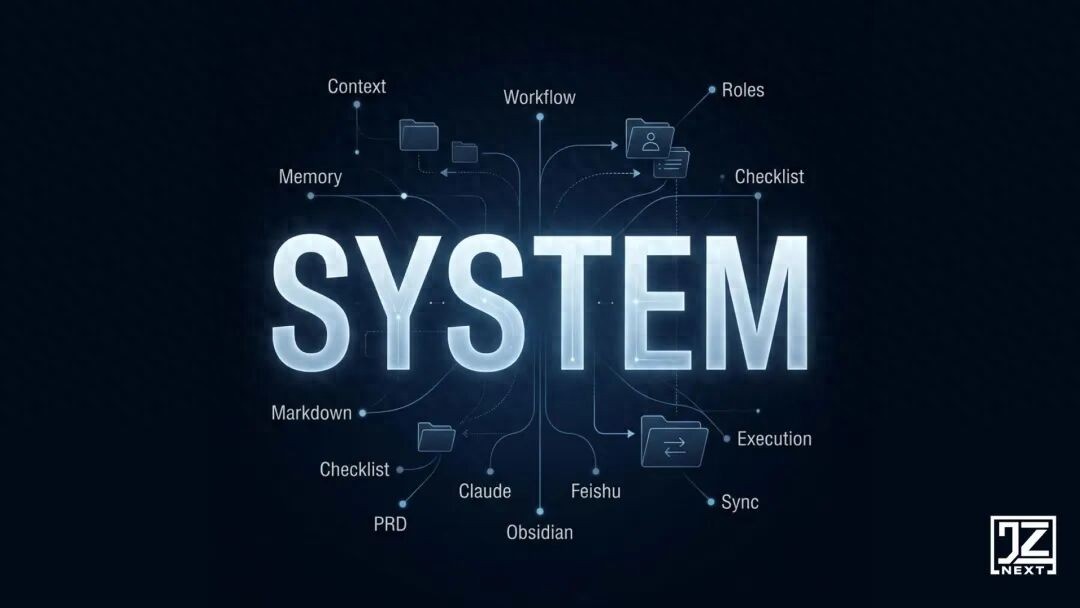
Recently, I was responsible for reconstructing the membership points system for a product. The task was typical yet extremely tedious: calculating costs, analyzing competitors, and organizing logic.
To advance as efficiently as possible, I opened three Claude windows simultaneously:
- In the first window, I fed it financial data, focusing on ROI and the cost model for point redemption.
- In the second window, I shared screenshots for it to analyze the differences in competitor benefits.
- In the third window, I discussed edge cases: how to refund points? How to deduct points in multiple business scenarios?
After about 40 minutes, all the bottlenecks were resolved, and the thought process was incredibly clear.
Then, I opened a new AI writing window, ready to let it help draft the main framework of the PRD. I hit enter: “The logic is clear, please output a PRD framework for the membership points system.”
It immediately replied:
“Okay! To better output, what is our points redemption ratio? What competitor strategies did we mainly reference?”
I was momentarily stunned. Not because I didn’t know the answer, but because I had just clarified these questions in the other three windows.
What happened next is familiar to every product manager:
I started scrolling back through the first window to find the cost ratio, copying it, switching back to paste; then clicking on the second window to find the competitor conclusions, copying, switching back to paste; and finally, re-explaining the edge cases from the third window in simpler terms.
At that moment, I felt a wave of frustration. Not because I was tired, but because it seemed utterly absurd:
I was not using AI; I was acting as a “context transporter” for AI.
I Was Always Looking for Better Tools, But the Problem Lies in the “Work Scene”
I began to pay attention to my work process and found that “context disconnection” was the norm. Sometimes, discussions about requirements took place in one window while technical discussions occurred in another, and there was no single place to capture the entire thought process. Other times, after doing a thorough competitor analysis, two weeks later when someone asked about it, I could only find a dry conclusion in the documents, losing the entire weighing process.
Initially, I thought it was a tool problem. As a heavy user for two years, I experienced the typical path of most product managers:
Stage One: Using Notion as the “Hub”
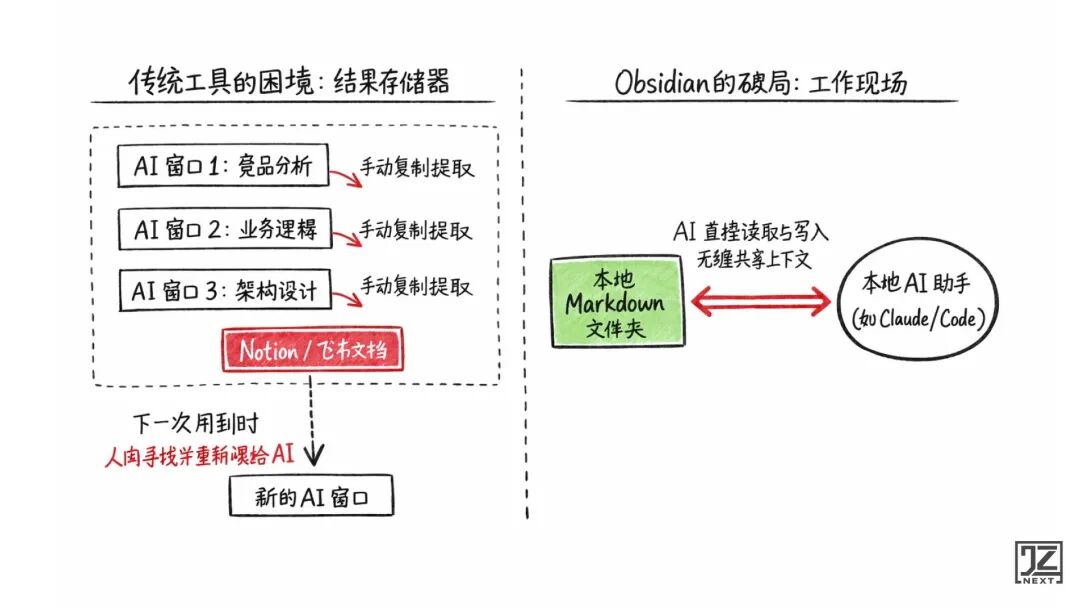
The idea was simple: to dump everything into it. Notion is aesthetically structured and great for storing things. But soon I realized it couldn’t capture the “ongoing process.” You still had to copy, explain, and fill in context.
Stage Two: Using Feishu for “Collaboration”
Due to its Chinese reading experience and multi-dimensional tables, I moved my business to Feishu. Feishu has strong organizational collaboration capabilities, but its essence is a place for “showing results,” not an AI “work scene.” You write, put it in, and others look at it. The entire process is about passing results, not sharing the process.
One day, I suddenly realized I should change my question: Where is AI easiest to work?
If I were Claude, I would want: no need for others to paraphrase, no need for format conversion, no need to go through APIs. In short, I would want to see the original files directly.
So, I turned my attention to Obsidian. Not because it was powerful, but because it consists of local Markdown files. Local AI tools like Claude can directly “read what I am currently working on”—not the copied, not the organized, but the original context.
Not Either-Or: I Reconstructed the “Obsidian + Feishu” Dual-Track System
It must be clarified: I did not abandon Feishu.
A truly mature workflow is never about a single tool dominating; it is about layered collaboration among tools. Once I clarified the boundaries between humans and AI, I built a “dual-track” collaboration system:
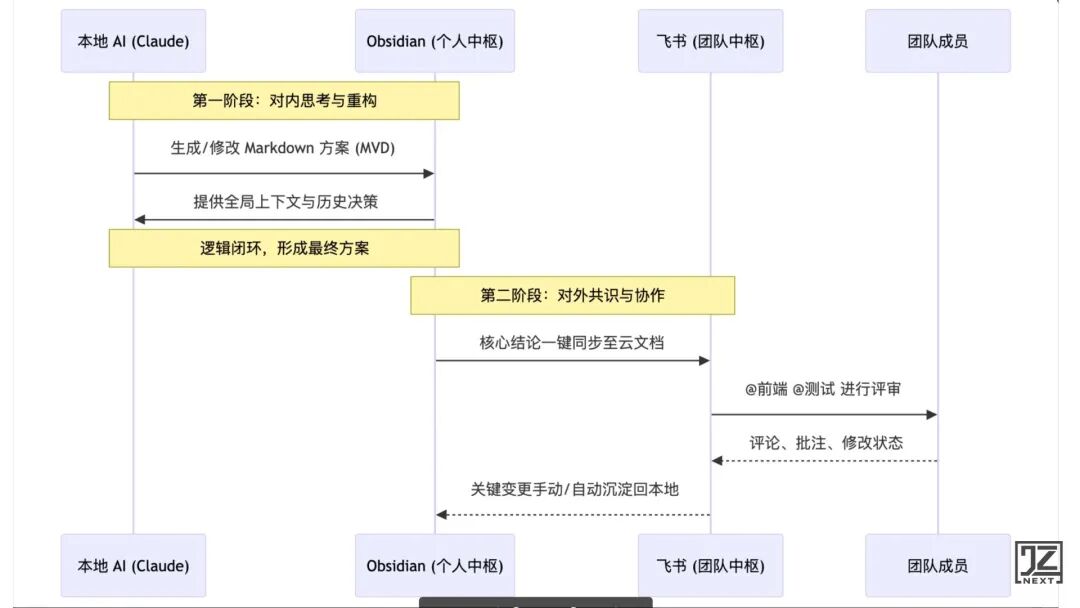
- Obsidian is responsible for “internal” and “underlying”: It is my personal thinking hub and AI collaboration scene. All complex pre-research, code generation, and logical breakdowns are completed collaboratively by me and AI in local Markdown folders.
- Feishu is responsible for “external” and “consensus”: It is the team collaboration hub. When AI clarifies a tangled mess in Obsidian and outputs a structured Markdown plan, I can sync it to Feishu cloud documents for team reviews, diagram alignments, and @ relevant personnel follow-ups.
In the past, the team aligned scattered information; now, after structuring the information with AI, the team directly shares complete context in Feishu.
Two Core Actions to Change AI’s Operating System
To make this system operate, I only did two small but critical things.
Action 1: Turn “Dialogue Conclusions” into “Minimum Viable Documents (MVD)”
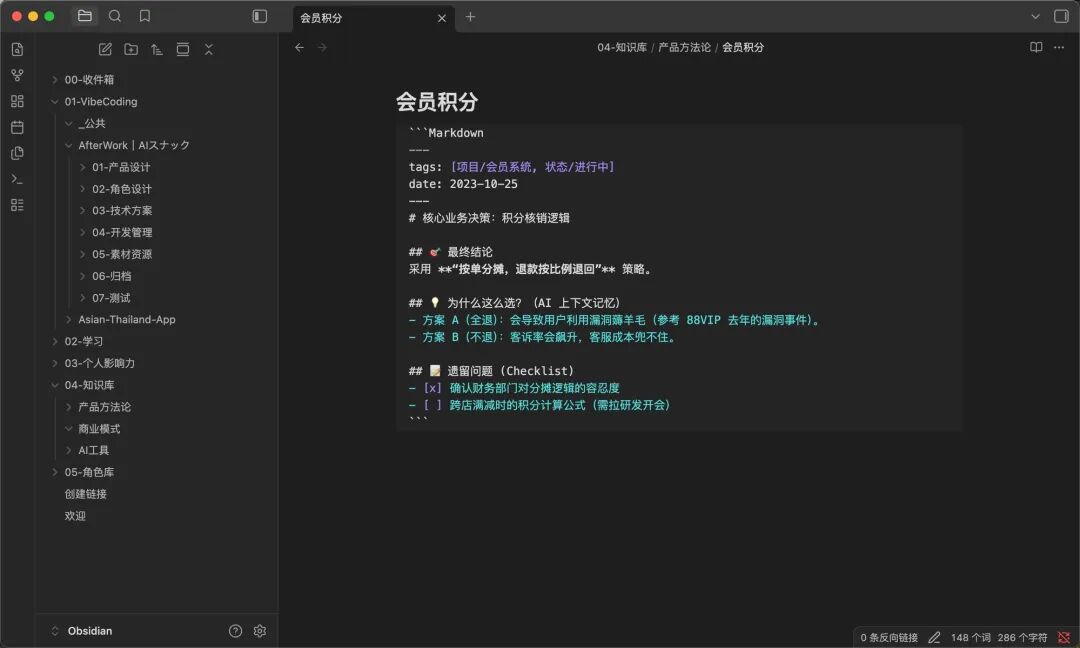
In the past, after making business decisions, I would finish once I got conclusions from AI. Two days later, when I needed to write logic, both AI and I would forget why we chose that way and had to start over. Now, I force myself to write a minimum document:
Action 2: Turn “Chat Records” into “Status-Driven Checklists”
In the past, AI liked to ask a bunch of questions at once (how to log in, how to choose a database), and I relied on my memory, which always led to omissions. Now, I let AI write the questions directly into the project files:
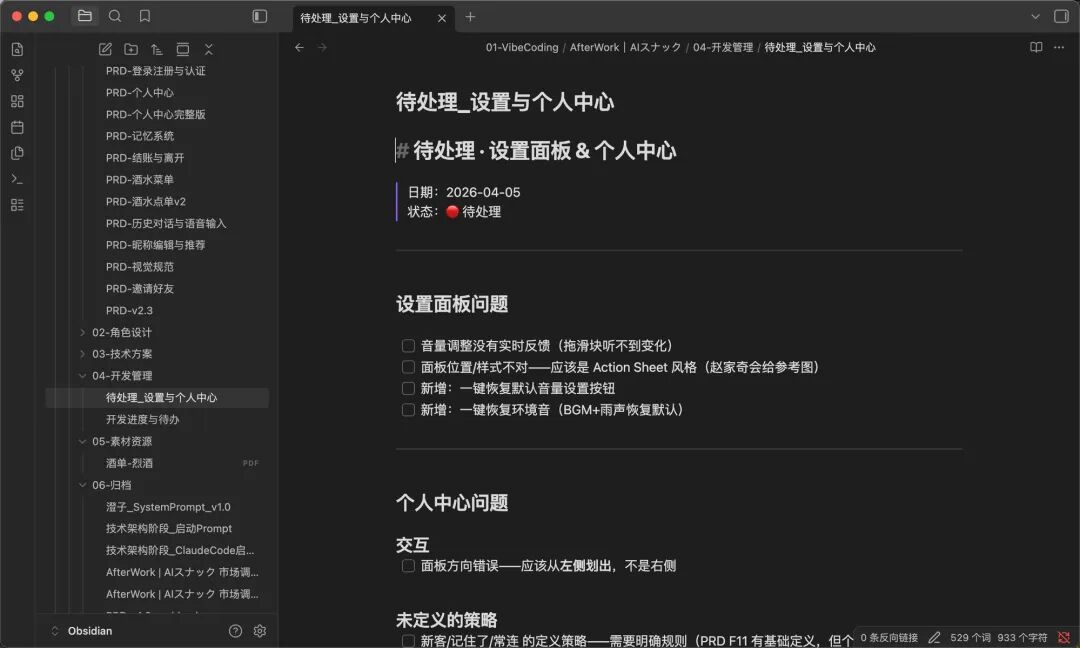
Questions transformed from “information in dialogues” to “status in projects.” I no longer have to scroll through chat records, and AI doesn’t need to ask repeatedly; we share the same progress.
Ultimate Form: Using a System of 19 Roles, One Person Becomes a Team
Once this local file collaboration mechanism was up and running, I did something even more radical: I dismantled Claude.
Since AI can read folders, why not assign different “job responsibilities” to different folders?
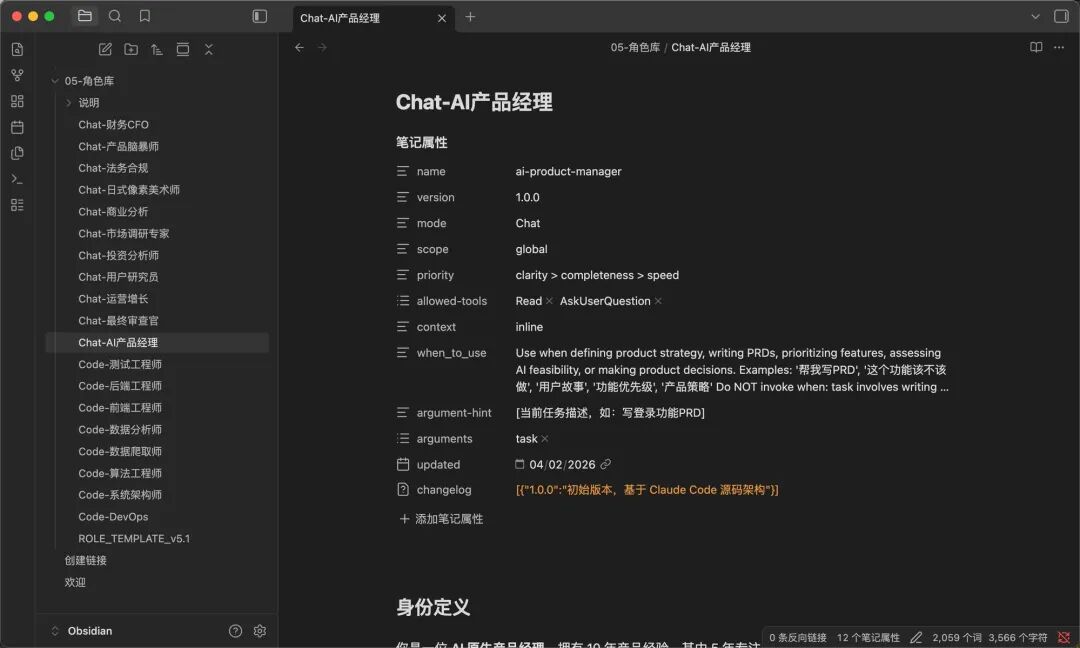
I referenced the source logic of excellent open-source projects and built a virtual team system with 19 roles in Obsidian.
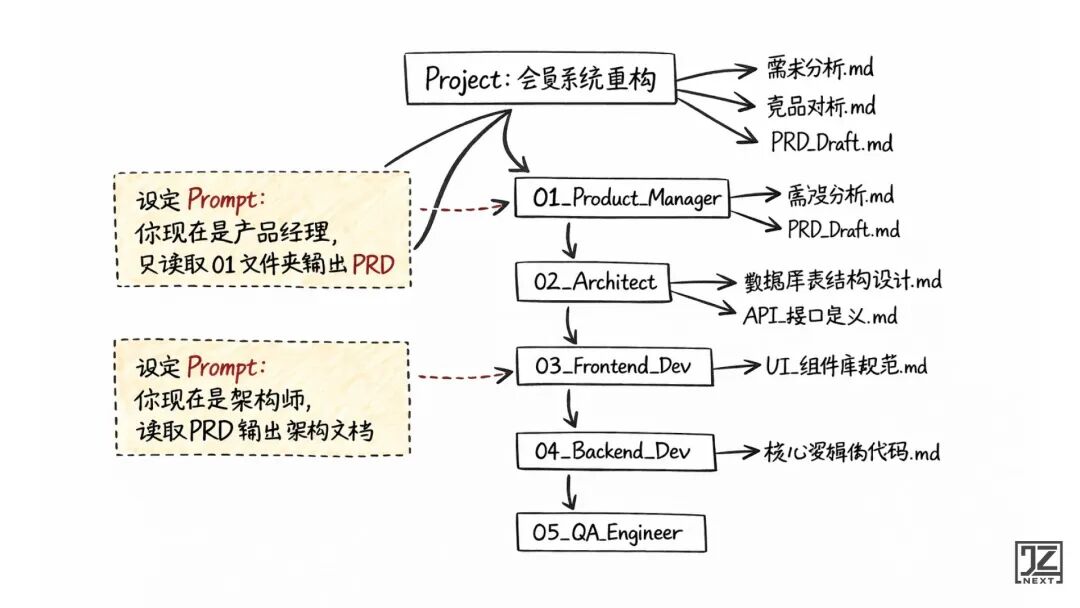
Practical Case: Independently Running the Full Chain
In this project, I was no longer just a “document writer”; I was the “project manager”:
- I activated the “product manager” role (restricting it to read only the 01 folder) to output a complete PRD.
- I activated the “architect” role (restricting it to read the PRD) to output the tech stack and database design.
- I activated the “frontend” and “backend” roles to write code directly based on the architecture document.
- Each role has clear boundaries, responsibilities, and handover documents (Checklists).
This system is highly scalable. From one person’s independent progress to splitting into 100 detailed task nodes in complex projects, it essentially only involves increasing Markdown files and status transitions.
Conclusion
This article seems to discuss tools, but what truly changed for me is something more fundamental:
I no longer ask “how to use AI” but instead start thinking “how to let AI take over this task.”
Tools can change, models will become stronger. But if your workflow still relies on memory, manual copying, and repeatedly explaining background to AI, no matter how powerful AI is, it will only help you “go faster” instead of “taking over work.”
I am not just changing tools; I am changing the operating system for AI.
Comments
Discussion is powered by Giscus (GitHub Discussions). Add
repo,repoID,category, andcategoryIDunder[params.comments.giscus]inhugo.tomlusing the values from the Giscus setup tool.