Why Cursor Can’t Compete with Claude Code
Recently, the AI programming community experienced a significant shift with Anthropic releasing the powerful programming model Claude 4.6 Opus, which can be used through the official command-line tool Claude Code.
Many developers have found an intriguing phenomenon: when calling Claude 4.6 Opus in Cursor, it often performs worse than running Claude Code directly in the terminal!
Despite using the same underlying model, why does Cursor struggle with complex tasks, cross-file refactoring, and autonomous bug fixing, while Claude Code operates smoothly?
Today, we will delve into the technical logic behind this. This is not just a difference between two tools but a reflection of the evolution from AI-assisted programming (Copilot) to AI agents (Agent).
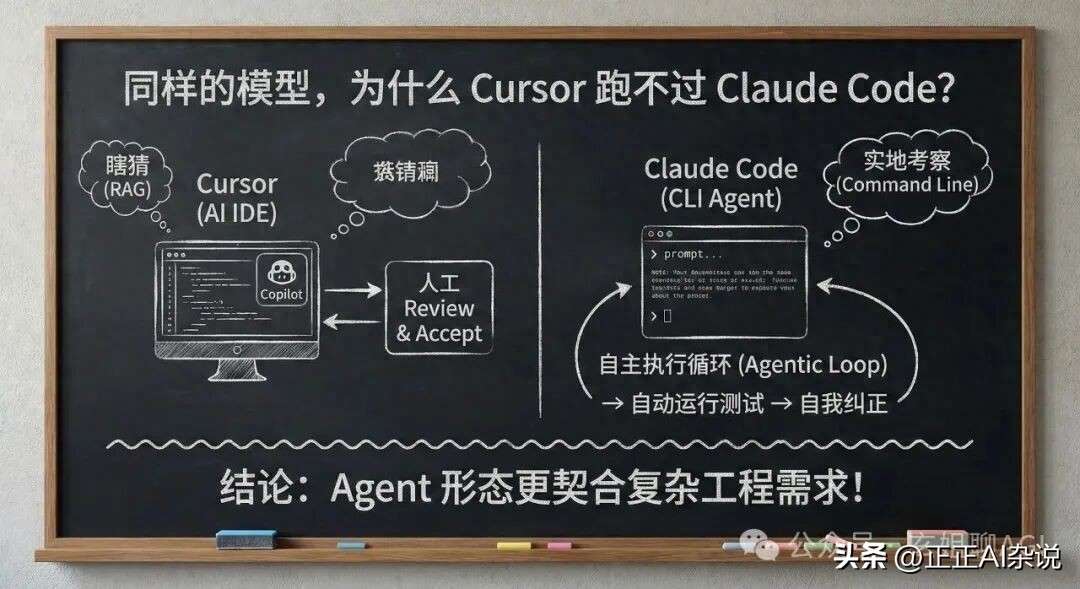
Difference 1: Interaction Paradigms - “Co-Pilot” vs. “Fully Automated Employee”
Cursor’s core positioning is as an AI IDE (Integrated Development Environment). Even with its powerful Composer feature, its product philosophy remains that of a “co-pilot”.
- Workflow: You present a requirement -> AI generates code -> You compare diffs in the GUI -> Click Accept to approve.
- Limitations: Each step requires human “visual confirmation” and intervention. When tasks involve modifying multiple files, developers can get stuck in an endless cycle of “Review -> Accept”.
In contrast, Claude Code is positioned as a CLI Agent (Terminal Intelligent Agent).
- Workflow: It runs directly in the terminal. You provide a macro goal (e.g., “change this component to React 19’s new syntax and fix errors”), and it enters an Agentic Loop.
- Dimensional Advantage: It automatically reads code, modifies files, runs test scripts, checks error logs, and self-corrects the code. The entire loop requires no frequent human clicks; it works like a real human colleague.
Difference 2: Context Acquisition - Guessing (RAG) vs. Field Investigation (Command Line)
Why does Cursor sometimes produce nonsensical outputs while Claude Code is precise? The core issue lies in the context provided to the model.
Cursor’s Approach: Black Box RAG Cursor vectorizes your codebase in the background. When you ask a question, it uses semantic retrieval (RAG) to “guess” which file snippets you need and packs them for the model.
Pain Point: As projects grow, RAG often retrieves the wrong files or misses critical dependency definitions. The model receives incomplete information, leading to poor code generation.
Claude Code’s Approach: “Field Investigation” under Unix Philosophy Claude Code, as a terminal tool, has the permission to execute system commands. It doesn’t guess; it behaves like a real programmer:
- It first runs
lsortreeto check the directory structure. - It uses
greporripgrepfor global variable searches. - It uses
catto view specific function implementations.
Advantage: The context it acquires is 100% certain and precise. It queries exactly what it needs, allowing Claude 4.6’s powerful reasoning capabilities to be fully utilized.
⚙️ Difference 3: System Prompts and Tool Invocation - Factory Tuning
Remember, Claude Code is Anthropic’s own creation.
Cursor needs to create a compatibility layer in the background: its System Prompt must accommodate the characteristics of various models like GPT-4o, DeepSeek V3, Claude 3.5, etc., forming a “universal chassis”.
However, Claude Code is deeply customized for the Claude 4 series:
- Its underlying Tool Calling mechanism is highly aligned with Claude 4.6 Opus’s training data.
- Anthropic’s engineers understand their model best, fine-tuning prompts for file reading, Bash command execution, and error analysis to perfection.
- Especially in conjunction with Claude 4.6’s Extended Thinking, Claude Code can natively and losslessly output lengthy contextual reasoning, while third-party IDEs often face performance bottlenecks or truncation when parsing long outputs.
Difference 4: Closed-Loop Error Feedback Handling
Writing code inevitably leads to errors. The attitude towards error handling determines the upper limits of AI tools.
In Cursor, if the AI modifies code leading to compilation failures, you typically need to copy and paste the error message and start a new dialogue: “It failed, let’s see what went wrong?”
But in Claude Code, due to its deep integration in the terminal environment, it can:
- Run
npm run build - Capture error messages from the terminal (Stderr).
- Identify a Type Error on line 45.
- Automatically open the file to fix line 45.
- Run
npm run buildagain until it succeeds!
This is why many feel Claude Code is “faster” and “more capable”. Not only is its reasoning AI-driven, but its validation process is also an AI closed loop.
Conclusion: How Should We Choose?
The fact that Cursor can’t compete with Claude Code does not mean Cursor has weakened; rather, the terminal Agent’s product form better meets the real-world demands of complex engineering.
However, this does not mean we should uninstall Cursor. The smartest developers have already discovered a workflow that combines the strengths of both:
Use Cursor for code editing, high-frequency fine-tuning, and reading source code. It remains the best and smoothest code editor available, with unmatched inline completion (Tab prediction).
For large cross-file refactoring, fixing difficult bugs, taking on new projects, and writing unit tests, open the terminal, activate Claude Code, input a command, and then go make a cup of coffee while it works for you.
Comments
Discussion is powered by Giscus (GitHub Discussions). Add
repo,repoID,category, andcategoryIDunder[params.comments.giscus]inhugo.tomlusing the values from the Giscus setup tool.